Email Settings
Enter the SMTP or Mailgun settings for your organization.
Note: Your organization may limit the number of e-mails that can be sent out at once. Please check with your internal IT department if you plan to send any large letter batches or expect a high volume of sales with related e-mails.
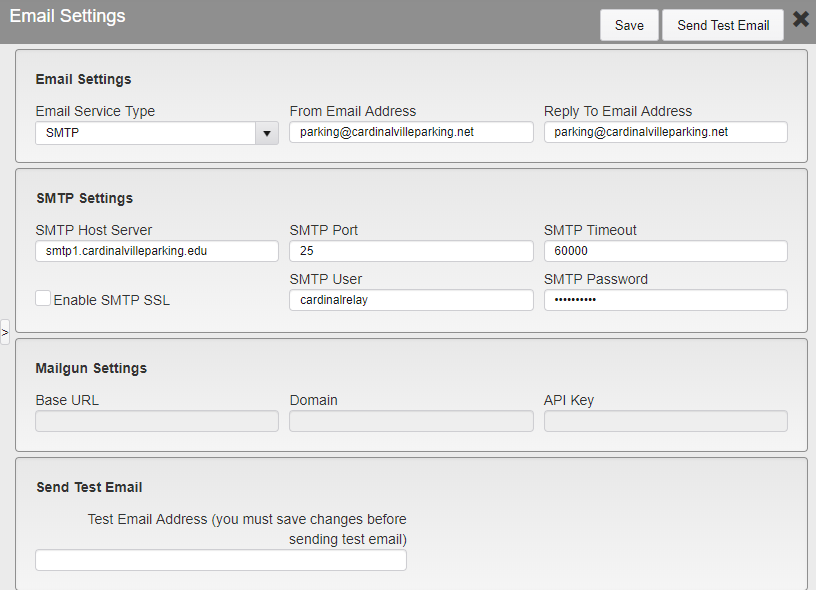
Email Settings
Email Service Type - Select if your organization uses SMTP or Mailgun.
From Email Address - Enter the e-mail address that e-mails sent by TickeTrak will be listed as from.
Note: This feature may not work with all SMTP settings.
Reply To Email Address - Enter the e-mail address that replies to e-mails sent by TickeTrak will be sent to.
SMTP/Mailgun Settings - These are the settings that allow TickeTrak to interact with your e-mail server.
Send Test Email - Once the settings are saved, you can send a test e-mail to ensure that the settings are working. To do so, enter the e-mail that you wish to receive the test message at, then click the Send Test Email button in the upper right.
Was this article helpful?
That’s Great!
Thank you for your feedback
Sorry! We couldn't be helpful
Thank you for your feedback
Feedback sent
We appreciate your effort and will try to fix the article