Common Tasks
Adding Users
Go to Admin - System Settings - Personnel.
Click Add to add a new user or click the pencil icon to update an existing user.
Type a password in the Password field and press tab. A second Password field will appear. Type in the new password a second time. Tab to the Force Password Change box and check it.
Go to Admin - System Settings - Group Security.
Add the users to the appropriate Security Group.
When the user attempts to log in for the first time using the password entered above, they will be prompted to enter a new password.
Password Rules
Passwords expire every 90 days. The user will be prompted to change their password the first time they log in after the expiration date has been reached.
Passwords must be at least 8 characters.
Passwords must have at least one non-letter, non-digit character (eg, ‘!’, ‘?’, ‘$’).
Passwords must have at least one lowercase letter (‘a’-‘z’).
Passwords must have at least one uppercase letter (‘A’-‘Z’).
- Passwords must have at least one number (‘0’-‘9’).
Viewing and Disconnecting Current Users
You can see who is logged into TickeTrak and disconnect them if needed.
Click Help - About on the navigation menu.
Click the View Current Users link.
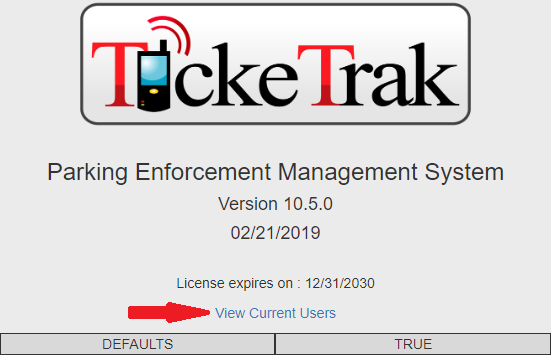
View Current Users Link
A list of active users will be displayed. You can disconnect a user by clicking the Disconnect button. A user who is Disconnected will be kicked out of the software, and will receive notice of this when they go to change pages or save any work, the same as if their session had timed out. They will be unable to save anything they are working on. This feature is best used to remove users who have not logged out properly and are taking up Licenses that other employees require to access the software.
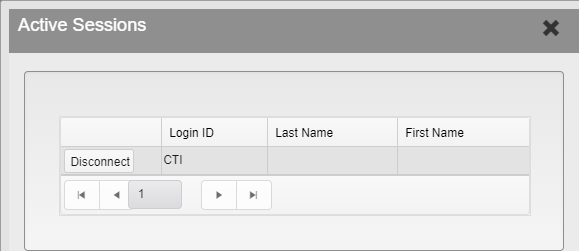
Active Sessions Menu
Was this article helpful?
That’s Great!
Thank you for your feedback
Sorry! We couldn't be helpful
Thank you for your feedback
Feedback sent
We appreciate your effort and will try to fix the article