Web API
Note: Web API is an optional module.
The Web API allows access to TickeTrak through applications developed by client developer teams. When this feature is active, settings that control various ways the two interact can be found here.
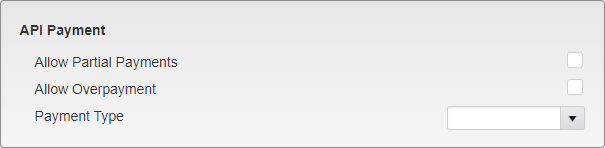
Web API - API Payment
Allow Partial Payments - Allows partial payments to be taken through the API.
Allow Overpayment - Allows overpayments to be taken through the API.
Payment Type - Select the Payment Type that will be shown on all payments taking through the API.
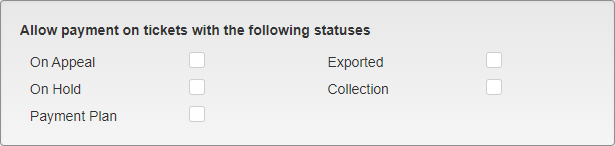
Web API - Allow Payment
This section allows you to determine what kinds of Tickets can be paid through the API. Check the box next to the statuses you wish to allow payments to be taken on. Tickets with none of these statuses are automatically allowed.
WebApi Clients are the client names and codes used by your API to connect to TickeTrak. Multiple Clients can be added.
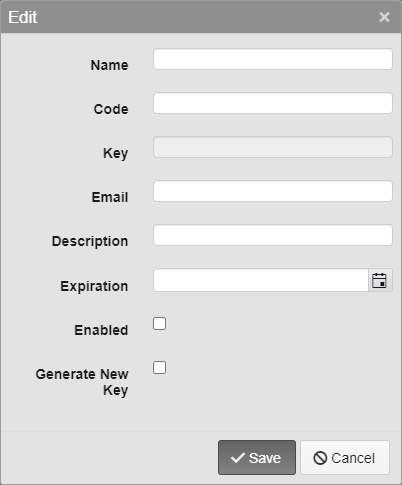
Web API - Client Settings
Name - Enter a name for the Client.
Code - Enter a Code for the Client.
Key - Keys are automatically generated when the Client is created.
Email - Enter an e-mail that will receive any notices generated by the Client.
This feature is not currently in use.
Description - Enter a description for the Client.
Expiration - Enter an expiration date for the Client. This can be left blank to allow the Client and Key to be used indefinitely.
Enabled - Check this box to enable the Client and Key for use.
Generate New Key - Check this box on an existing Client and save it to generate a new Key for that Client. This option will be unchecked the next time you open the Client to edit it.

Web API - Key Sample
Once a Client has been saved, you can easily copy the Key to send it to the developers by clicking the double page icon next to the Key.
Was this article helpful?
That’s Great!
Thank you for your feedback
Sorry! We couldn't be helpful
Thank you for your feedback
Feedback sent
We appreciate your effort and will try to fix the article