Person
Action Menu
Add Fee - Opens a window that allows you to add a Fee to the Person.
Audit History - Opens the Audit History for the Person.
Template Letters - Opens a window that allows you to select a Template Letter and send it to the Person.
Print Single Notice - Opens a window that allows you to select a Notice and send it to the Person without having to run a Batch.
Print Single Statement - Opens a window that allows you to select a Statement and send it to the Person without having to run a Batch.
Delete Person - Deletes the Person. You will be prompted to confirm that you wish to delete the Person.
Accept Payment - Opens the Accept Payment window with the Person information filled in.
Person Information
Header

Person Header
The Amount Due is the total amount the Person owes, including Tickets, Permits, and other Fees. The Person Fees shows the Fees specifically linked to the Person. The Credit Amount is the amount of Credit the Person has that can be used to pay off other Fines and Fees. The Account ID is the internal system ID linked to the account.
General Information
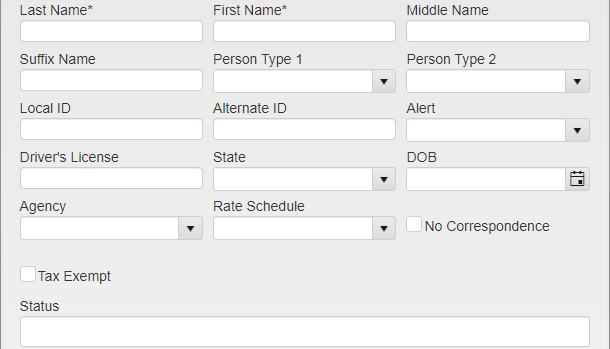
Person Menu
Last, First, and Middle Name are used to enter the Persons name. Suffix Name is used for any suffixes to their name, such as Jr., III, ect.
Person Type 1 and Person Type 2 are used to determine which permits the person can purchase on the web portal.
Local ID and Alternate ID are used to store IDs specific to your organization.
Alert allows you to select an Alert to attach to the Person. These can be used to note Returned Checks, Warrants, and more.
Driver’s License and State are used to enter driver’s license information.
DOB is used for the Persons Date of Birth.
Agency is selected from a list of Agencies associated with your organization.
Rate Schedule is used to assign a specific Permit price to the Person. These are set up in System Settings and may impact some Permits but not others.
Checking No Correspondence will prevent any further letters from being sent to the Person.
Checking Tax Exempt will prevent Sales Tax from being applied to any sale made to the Person, if you are using Sales Tax.
Status is used to enter statuses for the Person that have been defined by your organization. Click the box to open the Status dropdown. Click on the Status you wish to include to add it to the Person.
To remove a single Status, click the X next to that Status. To clear all of the Statuses, click the X at the end of the box.
Additionally, up to five User Defined Fields can be added to the module via System Settings. These fields can be used for any bookkeeping or notes as decided by your agency. Each field allows entries of up to 50 characters.
Contact Information
Expand to show Email Addresses and Phone Numbers.
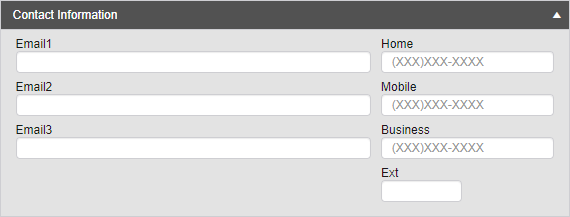
Contact Information
Enter up to three Emails for the Person, as well as their Home, Mobile, and Business phone numbers.
Person Group
Person Groups are now shown on the Person record. Below the Contact Information box, you will see a dropdown. Click on it to open the Person Group section and see what Groups the Person belongs to.
Address
Multiple addresses can be entered.
Edit icon is used to modify the record.
Billing address checkbox is used to determine which address a letter is physically mailed to.
Verify is used if the address is verified as valid. When Verify is checked, the date is automatically entered in the Last Verified field.
Inactive is used if the address is no longer valid.
Vehicle
Lists all Vehicles linked to the Person.
The primary Person is linked to all new Tickets.
The Vehicle icon is used to open the mini Vehicle module to make changes to the Vehicle like color or body etc.
The edit icon is used to change the relationship.
Title Start and Title End are used to assign Tickets to the correct Person. If the title end date is reached new tickets will no longer link to the Person.
Primary is used to make the Person the primary owner of the Vehicle. All new Tickets on the Vehicle will be linked to this Person. If any Tickets exist on that Vehicle with no Person linked, you will be prompted to link them if desired.
Unlink will remove the link between the Person and the chosen Vehicle. All other links on either of these will remain intact.
Tickets and Permits
The Ticket and Permit boxes show all of the Tickets and Permits linked to the Person. The Ticket box also shows the total Ticket Amount the Person owes.
Finance
Each Fine and Fee attached to the Person is displayed in the Finance grid. Click the arrow to expand and see payment information if present.
History
The History box contains a record of all major changes and additions to the Person, as well as the dates they were made and the account that made them.
Was this article helpful?
That’s Great!
Thank you for your feedback
Sorry! We couldn't be helpful
Thank you for your feedback
Feedback sent
We appreciate your effort and will try to fix the article