Boot/Tow
Note: Boot/Tow is an optional module.
The Boot/Tow module is used to coordinate Booting and Towing vehicles.
Action Menu
Add Fee - Opens a window that allows you to add a Fee to the Boot/Tow.
Audit History - Opens the Audit History for the Boot/Tow.
Template Letters - Opens a window that allows you to select a Template Letter and send it to the Person the Boot/Tow is attached to.
Delete Ticket - Deletes the Boot/Tow. You will be prompted to confirm that you wish to delete the Boot/Tow.
Note: The find button will always perform a search of the entire module.
Boot/Tow Information
Boot/Tow records submitted from the handheld can be searched for in the Boot/Tow module. Information from the handheld will be loaded into the relevant sections.
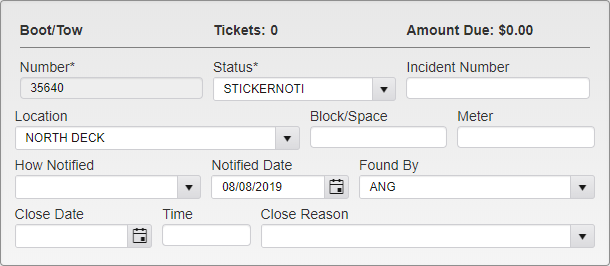
Boot/Tow General Information
The header indicates the number of Tickets attached to the Vehicle the record relates to, and the total Amount Due for that Vehicle.
The Boot/Tow Number is generated by the handheld when the Boot/Tow record is submitted.
The Status indicates the current Boot/Tow status of the Vehicle, as selected by the issuing Officer. The available options are pre-set in the system.
Boot Eligible - The Vehicle is eligible for Booting.
Tow Eligible - The Vehicle is eligible for Towing.
Booted - The Vehicle has been Booted.
Sticker Notice - A Sticker Notice has been placed on the Vehicle.
Towed - The Vehicle has been Towed.
Paid - The Fees associated with the Boot/Tow have been paid.
Closed - The Boot/Tow has been resolved and is closed.
Vehicle Disposed - The Vehicle has been relocated.
The Incident Number can be used to note additional identifying records related to the Boot/Tow.
Location, Block/Space, and Meter are all used to note the location of the Vehicle.
How Notified and Notified Date are used to indicate the manner and date on which the Person attached to the Vehicle was informed of pending action. This can be accomplished with a Sticker placed on the Vehicle, or with a written Notice sent to the Person directly.
Found By indicated the Officer who found the Vehicle and created the Boot/Tow record.
Closed Date, Closed Time, and Closed Reason are used when the Boot/Tow record is resolved and closed.
Vehicle and Person
These sections indicate the Vehicle and Person that the Boot/Tow record refers to.
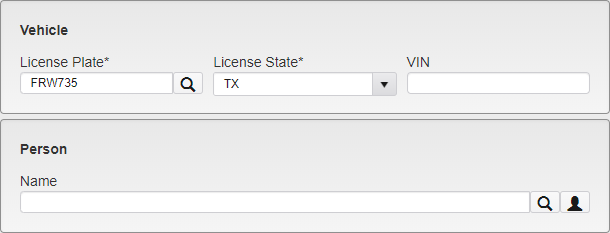
Vehicle and Person Information
Entering a new Plate in the License Plate field and clicking the magnifying glass icon allows you to search for a Vehicle to attach to the record.
Entering a name in the Person Name field and clicking the magnifying glass icon will search for a Person to attach to the record. Clicking the person icon next to that field will open a mini Person module to enter new Person information to attach to the record.
Boot
This section shows information about the Boot.
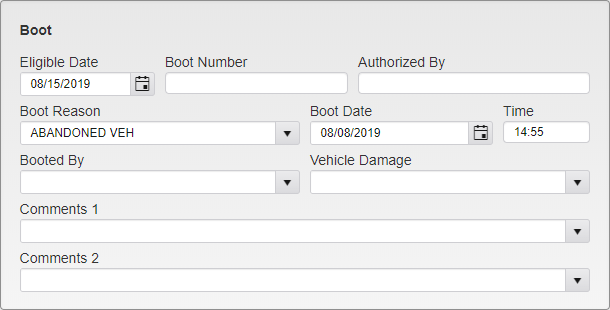
Boot Information
Eligible Date shows the date on which the Vehicle is eligible for Booting. This is usually used in cases where a Notice or Sticker has been placed, giving the owner a set amount of time to move the Vehicle.
Boot Number is the identification number of the Boot used on the Vehicle.
Authorized By shows the Officer who authorized the Boot.
Boot Reason shows the reason the Vehicle was Booted.
Boot Date and Time show when the Boot was placed.
Booted By shows the Officer that placed the Boot.
Vehicle Damage is used to note damage made to the Vehicle when Booting.
Comments 1 and 2 show various comments relating to the Boot.
Release
This section contains information about when a Boot was released.
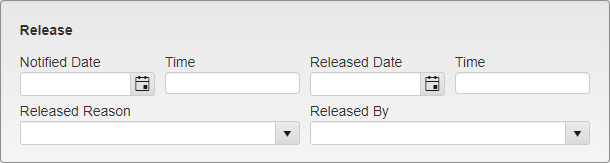
Boot Release Information
Notified Date and Time show when the Officer in the field was notified that the Boot should be removed.
Released Date and Time show when the Boot was removed from the Vehicle.
Released Reason shows why the Boot was removed.
Released By shows the Officer that removed the Boot.
Tow
This section shows information about the Tow.
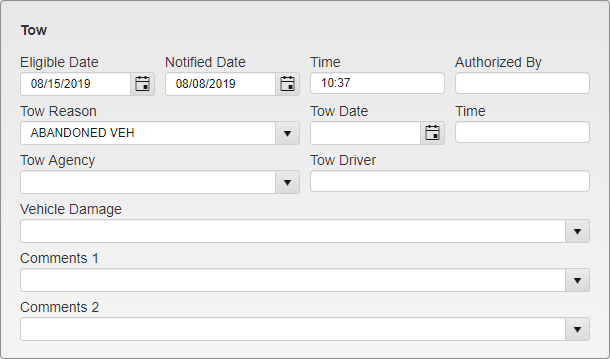
Tow Information
Eligible Date shows the date on which the Vehicle is eligible for Towing.
Notified Date and Time show when the Vehicle’s owner was notified of the pending Tow.
Authorized By shows the Officer who authorized the Tow.
Tow Reason shows the reason for the Tow.
Tow Date and Time show when the Vehicle was Towed.
Tow Agency and Tow Driver show who Towed the Vehicle. The Agency is selected from a list set up in System Settings.
Vehicle Damage shows any damage to the Vehicle in the process of Towing.
Comments 1 and 2 show various comments relating to the Tow.
Tickets
This section lists any unpaid Tickets associated with the Vehicle in question.
Fees
This section lists any Fees associated with the Boot/Tow.
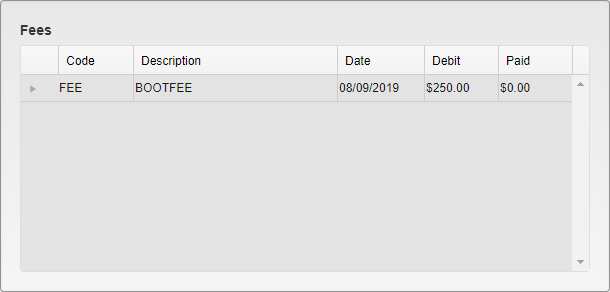
Boot/Tow Fees
If the Fee has been paid, you can click the arrow next to the Fee listing to expand it and view the payment information.
Was this article helpful?
That’s Great!
Thank you for your feedback
Sorry! We couldn't be helpful
Thank you for your feedback
Feedback sent
We appreciate your effort and will try to fix the article