Payment Plan
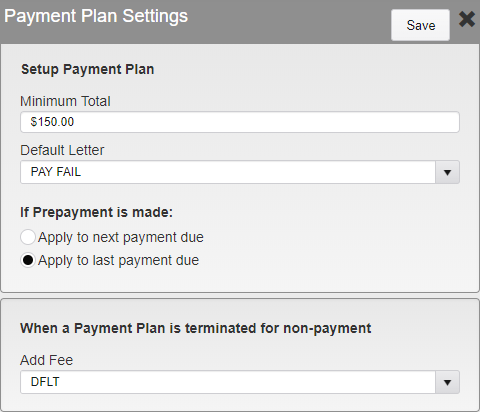
Payment Plan Settings
Payment plans can be set up for Persons with large amounts owed.
Minimum Total - Select the Minimum Amount a Person must owe before being allowed to set up a Payment Plan.
Default Letter - Select the Default Letter sent to the Person when a Payment Plan is set up.
If Prepayment is made:
Apply to next payment due - Apply payments made after the current bill is paid off to the next amount due. This will allow the next payment due date to be pushed back.
Apply to last payment due - Apply payments made after the current bill is paid off to the total amount owed. This will reduce the total owed, but the Person will still owe the standard amount on their next bill.
When a Payment Plan is terminated for non-payment - Select the Fee to be added to the Person account when a payment is not made.
Was this article helpful?
That’s Great!
Thank you for your feedback
Sorry! We couldn't be helpful
Thank you for your feedback
Feedback sent
We appreciate your effort and will try to fix the article