Late Fees

Late Fees TreeView
General Settings
Late Fees are added to unpaid Tickets that meet the selected criteria. Multiple levels of Late Fees can be set up per violation. Late Fees can be run as a scheduled procedure after it has been set up.
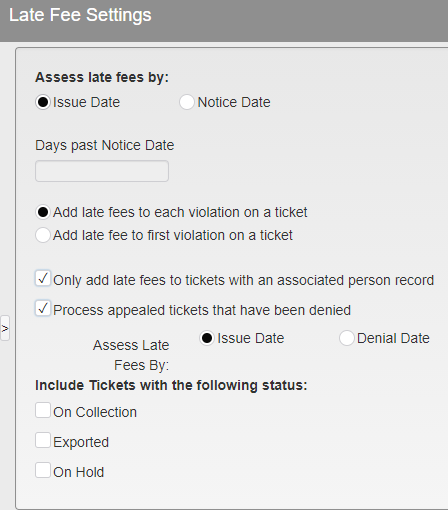
Late Fee Settings
Assess late fees by:
Issue Date - Issue date of the Ticket.
Notice Date - If by Notice date, how many days past Notice Date or Appeal Denial Date.
Add late fees to each violation on a ticket - If multiple violations are added per ticket a late fee will be added to each one.
Add late fees to first violation on a ticket - Only one Late Fee will be added per Ticket.
Only add late fees to tickets with than associated person record - Tickets must have an associated Person before Late Fees are applied.
Process appeal tickets that have been denied - Late Fees are not added while a ticket is on Appeal. You may add Late Fees if the Appeal has been denied. If this option is checked, you may Assess Late Fees By:
Issue Date - Issue date of the Ticket.
Denial Date - Denial date of the Appealed Ticket.
Include tickets with the following status - Late Fees will not be added to Tickets with the following status unless checked.
On Collection
Exported
On Hold
Late Fee Structure
Late Fee Structure allows the setup of a distinct Late Fee for every violation. Multiple levels are allowed. The Ticket must have a Level 1 Late Fee prior to receiving a Level 2, a Level 2 Late Fee prior to receiving a Level 3, etc.
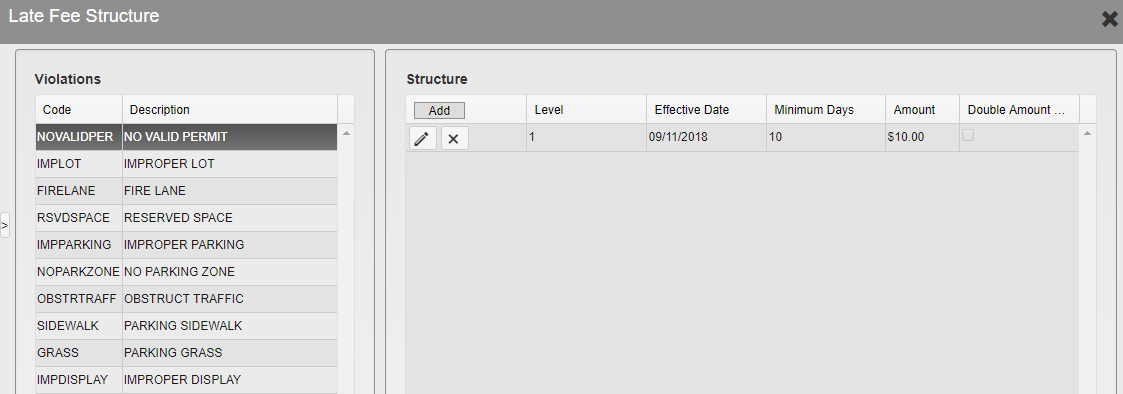
Late Fee Structure Menu
All violations are listed on the left side.
Select a Violation by clicking it. The Structure may then be added, edited, or deleted.
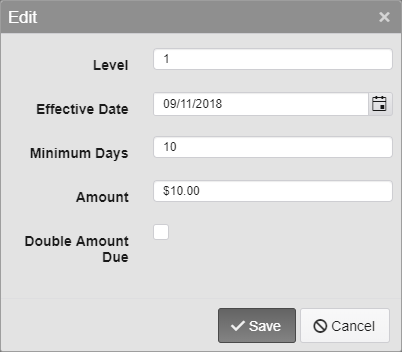
Late Fee Options
Level - Select the level of the Late Fee.
Effective Date - Select the date the Late Fee should be effective. Tickets that meet the requirements but were issued before this date will not have the Late Fee added.
Minimum Days - Select the minimum number of days the Ticket must be unpaid before a Late Fee is added.
Amount - Select the amount of the Late Fee to be added.
Double Amount Due - Double the amount due on a Ticket rather than adding a set Fee.
Was this article helpful?
That’s Great!
Thank you for your feedback
Sorry! We couldn't be helpful
Thank you for your feedback
Feedback sent
We appreciate your effort and will try to fix the article